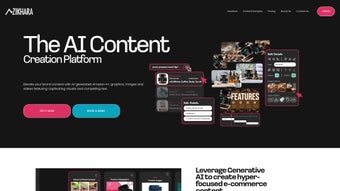

Download Zikhara AI – AI‑Powered E‑Commerce Content Generator
Overview
Zikhara AI is a web‑based platform designed to streamline the creation of e‑commerce content through advanced artificial intelligence. The service targets online retailers, brand managers, and digital marketers who need high‑quality product descriptions, Amazon A+ pages, custom visuals, infographics, and more—all without the traditional bottlenecks of manual copywriting and graphic design. By simply inserting a product URL, confirming the key details, and letting the AI do the heavy lifting, users receive ready‑to‑publish assets that can be instantly edited to reflect brand tone, font styles, color palettes, and other visual guidelines.
Zikhara AI also supports bulk uploads, enabling the simultaneous generation of dozens or even hundreds of product listings, which is a major time‑saver for large catalogs. All content is stored securely in the cloud, giving teams confidence that their intellectual property remains protected. Whether you run a single‑store Shopify shop or manage a multi‑marketplace enterprise, Zikhara AI promises to reduce the time‑to‑publish, cut outsourcing costs, and keep your brand voice consistent across every channel.
Key Features that Power Your Store
- AI‑Generated Product Text: Automatic creation of SEO‑friendly titles, bullet points, and long‑form descriptions that rank well in search engines.
- Amazon A+ Content Builder: Generates rich media modules, comparison tables, and brand stories that meet Amazon’s strict guidelines.
- Visual Creation Suite: Produces product images, lifestyle photos, and infographics with customizable fonts, colors, and layouts.
- Bulk Upload Capability: Upload CSV or Excel files containing dozens of product URLs to generate content in batch mode.
- Brand‑Centric Editing Tools: Inline editors let you tweak text, swap images, adjust typography, and apply brand palettes without leaving the platform.
- Secure Cloud Storage: All generated assets are saved in encrypted storage, with role‑based access controls for team collaboration.
- Multi‑Channel Export: Export files directly to Shopify, WooCommerce, Amazon Seller Central, or download in CSV, PNG, and PDF formats.
- Continuous Learning Engine: The AI model updates weekly based on user feedback, industry trends, and new SEO best practices.
Installation, Usage & Compatibility
Getting Started – No Download Required
Zikhara AI is a cloud‑native SaaS solution, which means you never need to install bulky software on your Windows, macOS, Android, or iOS devices. To begin, visit the official website, create a free account, and verify your email. The onboarding wizard walks you through the initial setup, prompting you to link your e‑commerce store or simply paste a product URL for a trial run. Because the platform runs entirely in the browser, it works on the latest versions of Chrome, Edge, Safari, and Firefox.
Step‑by‑Step Workflow
- Enter Product URL: Paste the link of the product you wish to enrich. Zikhara AI instantly pulls basic specifications (price, SKU, dimensions) via web scraping or API integration.
- Confirm Details: Review the auto‑extracted data and correct any mismatches. This step ensures the AI has accurate input for content generation.
- Select Output Types: Choose whether you need a product description, Amazon A+ module, infographic, or a full suite of assets.
- Generate: Click “Create” and let the AI process the request. Most single‑product outputs appear within 30‑45 seconds.
- Edit & Refine: Use the built‑in editor to adjust tone, swap images, or modify color schemes. All changes are saved automatically.
- Export or Publish: Download the files or push them directly to your store through the integrated connectors.
System Requirements & Supported Operating Systems
- Desktop: Windows 10/11, macOS 12+ (Catalina and later)
- Mobile: iOS 14+, Android 9+ (Chrome or native browser)
- Browser: Latest Chrome, Edge, Safari, Firefox – with JavaScript enabled
- Internet: Minimum 5 Mbps broadband for optimal performance during bulk generation
Because Zikhara AI is fully hosted in the cloud, you benefit from automatic updates and security patches without any manual intervention. The platform adheres to GDPR and CCPA standards, offering data‑processing agreements for enterprise customers who need additional compliance guarantees.
Pros, Cons & Frequently Asked Questions
Pros
- Fast, AI‑driven content generation reduces manual effort by up to 80 %.
- All‑in‑one suite covers text, images, and Amazon‑specific modules.
- Bulk upload feature accelerates large‑catalog updates.
- Secure cloud storage with role‑based permissions protects brand assets.
- Multi‑channel export saves time when syncing with different marketplaces.
Cons
- Requires a stable internet connection; offline usage is not possible.
- Initial AI output may need brand‑specific fine‑tuning for niche voice.
- Pricing tiers can become costly for very high‑volume enterprises.
- Advanced visual customization is limited compared to dedicated graphic design tools.
FAQ – Your Most Common Questions Answered
Is Zikhara AI free to use?
Zikhara AI offers a 7‑day free trial with access to all core features. After the trial, you’ll need to choose a paid plan based on the number of generated assets per month.
Can I integrate Zikhara AI with my existing Shopify store?
Yes. Zikhara AI provides a native Shopify connector that lets you push generated product descriptions and images directly into your store with a single click.
How secure is my data on Zikhara AI?
All data is stored in encrypted cloud servers (AES‑256) and complies with GDPR, CCPA, and ISO‑27001 standards. Access can be limited by role‑based permissions for team members.
What types of content can the AI generate besides product text?
Zikhara AI can create Amazon A+ modules, infographics, lifestyle product images, comparison charts, and even short promotional videos (beta feature).
Is there a limit to how many products I can upload at once?
The platform supports bulk uploads of up to 5,000 product URLs per file on enterprise plans. Lower‑tier plans have lower caps, but you can always split large catalogs into multiple batches.
Overall Rating: 4.5/5 – Zikhara AI delivers a robust, AI‑driven workflow that significantly reduces the time and cost of e‑commerce content creation, while still offering enough manual control for brand consistency.
Conclusion & Call to Action
For e‑commerce operators who are tired of juggling copywriters, graphic designers, and marketplace compliance checks, Zikhara AI provides a unified, secure, and scalable solution. The platform’s ability to turn a simple product URL into a full suite of SEO‑optimized text, Amazon‑ready A+ modules, and custom visuals in minutes is a genuine productivity breakthrough. While the reliance on an internet connection and the need for occasional human polishing are minor trade‑offs, the overall ROI—especially for medium to large catalogs—makes Zikhara AI a compelling addition to any digital merchandising toolkit. Ready to see how AI can accelerate your product listings? Start your free trial today and experience faster, smarter content creation.



.png)



